While my audience here is pretty limited these days, I do feel a bit remiss that I haven’t given an update for anyone still following along. I’ve been pretty immersed in COVID-19 research since towards the end of February, and have had lots of private conversations, but I probably should have posted something earlier, considering how much of my time I’ve been spending on the topic.
This guide is focused on preventative best practices (including how to safely reuse PPE), and description of symptoms and what catching the virus might look like.
For those looking for some news/resources:
My COVID-19 Twitter List – a lot of epidemiology, stats and modeling, but also discussion on treatment, pathophysiology, etc.
COVID-19 Reddit subs – here’s my multi. It started with r/Coronavirus (news) and r/COVID19 (academic papers) but I’ve added a few extra ones – note, almost every region has a local COVID-19 sub
COVID19 Zotero Export – This needs a bit of refactoring, but a pretty good snapshot of the past month’s worth of research. It’s my active goal during this lockdown to be able to move this stuff into a better public format. (currently about 1200 items)
For those that don’t know, I’ve been in Tokyo since the beginning of March and expect to be here for the next few months. While things have been calmer/more normal than expected for the past month, sadly, I expect things to start getting serious in the next week or two – testing and general pandemic response has been seemingly quite terrible, but I guess we’ll see.
I’ve been using Linux laptops for the past few years, most recently a very portable C302 Chromebook running GalliumOS that sadly stopped charging a while back and never recovered (definitely don’t recommend), and a slightly less portable Gigabyte Aero 14 that’s taken a beating, but keeps on ticking.
While the Aero still works fine, and it’s light for a gaming laptop (with a VR capable GTX 1060 GPU), at 2kg and with a massive power brick, it’s still heavier and bulkier than I’d prefer to travel with now that I rarely use the dGPU (which also makes external HDMI output a real pain). I was meaning to just wait for the new AMD Zen2 mobile chips (scheduled to be announced at CES in a couple weeks and with some great performance numbers leakinglately) early next year and seeing how any new laptops announced stack up against some of the strong Ice Lake options before buying a replacement laptop, but since I’ll be hitting the road again next month and the new AMD laptop models seemed unlikely to ship for a while (if the timing gap from last year’s models are anything to go by), and since there have been some crazy laptop deals lately, I decided to grab a dirt cheap last-gen AMD Ryzen laptop as a potential temporary placeholder on a lark and give it a spin. I’ve been pleasantly surprised so far.
I bought the Motile M142 (14″ FHD IPS/Ryzen 3500U/8GB RAM/256GB SATA SSD) for $300 (it seems to be bouncing up and down in price a bit; there’s also a Ryzen 3200U model that’s regularly been dropping to $200). It is a Walmart-only brand (Tongfang is the ODM), and besides being as light as most high-end ultrabooks at just over 1.1kg, it’s also surprisingly well built (it was also originally priced at $700 and has been subsequently discounted). Notebookcheck has a comprehensive review (there are some other discussions, reviews and videos online if you search for Motile M142), and it’s not the only ~$300 AMD Ryzen laptop available (it is the lightest, and the only real trade-off is that it is a single-channel memory device), but I thought I’d focus writing up some of the more Linux-specific aspects.
The TL;DR on it is that running Arch with the latest kernel (5.4.6), firmware (20191215.eefb5f7-1) and mesa (19.3.1), basically everything, from the keyboard (including backlight), trackpad (including gestures), wireless, sound, external HDMI output, screen brightness, webcam, and suspend, all just work. (Yes, I’m just as surprised as you are.)
Some more detailed notes:
I got the black version (more of an extremely dark grey) that looks pretty sharp (here’s a video of the silver version, and the black version), although the plastic on the keyboard does immediately start picking up some finger grease. My unit (manufactured in Sep 2019) had a slight imperfection on a corner but I didn’t feel like waiting for another 2-weeks to swap out what ultimately will be a somewhat disposable laptop.
As mentioned, this laptop is quite lightweight at 1.1kg (2.5lb), and it’s also thin, at 15mm thick (but still has gigabit ethernet (Realtek) with one of those neat flippy jacks). The screen bezels are also quite thin, which is a nice bonus, and reduces the overall footprint.
The screen is matte IPS, but not especially bright or color accurate (about 250nits, 62% sRGB), but it’s comfortable enough to use w/o any complaints. I’m currently using clight for automatic dimming/gamma adjustment and it works great with the webcam and geoclue2. Also no problem using arandr for external HDMI output, resolution switching, etc.
I booted into Windows when I got it just to give it a quick spin (the product code is blown into the BIOS so you can get that easily) and gave the included SSD a quick test (SATA3, and the expected ~450MB/s read and writes).
After that I cracked the laptop open. All you need to do is unscrew 6 fully exposed #00 screws to pop off the back, but one corner screw on mine was firmly stuck and stripped. I was still able to access what I needed and I swapped out the 1×1 AC Intel 3165 wireless card with an extra Intel AX200 I had lying around (the 3165 isn’t bad and is fully Linux compatible, but I was able to go from 270Mbps to 500Mbps in real-world AC transfers). There is a second M.2 slot, and I put an extra NVMe drive I had lying around for my Linux drive.
Probably the biggest caveat worth mentioning is it has a single SODIMM slot – you can upgrade the RAM, but it is single channel. There are also no BIOS options to speak of, you’ll be locked to 2400MHz on the RAM (interestingly, according to dmidecode, the 8GB stick of RAM included is actually rated at 2666, but running at 2400). The biggest impact of single channel memory is on gaming (GPU) performance, which can be 50% slower than a dual channel setup. If GPU performance is a concern, a refurbed HP 15-cw1063wm at about the same price is probably a better way to go (or something with a dGPU if you want to deal with that).
While this laptop has USB-C, like many in its class, it’s missing USB-C PD. This was a minor concern for me since I’ve been focused on minimizing power adapters/standardizing on USB-C for travel power, but I’m happy to report that since it uses a standard 19V/5.5mm barrel jack, it worked perfectly with a cheap 5.5mm to USB-C PD adapter cable I had, so if you have a USB-C PD charger you like already, then that’s all you need. It also charges without issue from my external USB-C PD capable power bank.
This laptop comes with a 47Wh battery, which is actually pretty great for it’s class (and better than all the similarly-priced alternatives). Out of the box, the laptop idled at around 12W. Running tlp I was able to get that down to about 8W. Surprisingly powertop --auto-tune was actually able to do better and I’m currently idling at about 6W (7-8W under light usage like right now). I’ll probably spend a bit more time tweaking power profiles (maybe using RyzenAdj to throttle to keep temps low), but it looks like right now I’m looking at about 6h of battery life under light usage. This is one aspect that hopefully the new Zen2 models can significantly improve.
Speaking of which, I haven’t played around much w/ ZenStates or RyzenAdj yet except to confirm they do work. The fan isn’t too distracting but it will spin up even during normal use at default settings (you could probably use RyzenAdj to keep temps below the fan curve – looks like it starts to spin up at ~42C. The cooling seems to be sufficient: if I use RyzenAdj to bump the temp limits up to 90C, it can sustain 3.2GHz clocks on all cores running stress at about 82C.
The screen hinge only goes to 160 degrees, but the laptop is light enough that I can still use a compact tablet stand to stand it up. When I’m working at a desk I tend to prefer that setup w/ a 60% keyboard and a real mouse.
The built-in keyboard is fine (nothing to write home about, but perfectly cromulent for typing – I’m writing this review on it) and some of the Fn keys work hardcoded (like the keyboard backlight controls) but the rest show up on xev. The trackpad is also fine (smooth enough and decently sized), and has the usual fidgety middle click support if you are able to click directly in the middle. Both are PS2 devices.
Sound works out of the box with pulseaudio/alsa, using AMD’s (Family 17h) built in audio controller. Speakers aren’t very good, but the headphone jack works fine/switches output like it should. Webcam works as well.
Things aren’t perfect, but so far seem to be relatively minor niggles. This list might grow as I use this more (or might shorten with updates or some elbow grease):
I’ve read about all kinds of stability and suspend issues with Ryzen mobile laptops, and sleep and suspend seems to work OK, but I have run into at least one compositor issue (which resolved itself when I closed the laptop and reopened it), and the laptop doesn’t like it when you run suspend directly (which seems to bypass the tlp-sleep and systemd-suspend services that do a bunch of cleanup steps. I solved a black screen resume issue I had initially by installing xf86-video-amdgpu.
There are a few keyboard niggles. It looks like asus_wmi and wmi_bof are loaded by default (WMI) and hard links about half the shortcuts (sleep, super-lock, network radios, perf-mode, keyboard backlight) and passes through the sound and backlight keys (acpid shows the hard-link events as all the same). One thing that took a bit of figuring out is that Fn-F2 is a super-lock switch which will disable the super/windows key.
The lid close works for suspend but not for wakeup (to wake up, hitting the keyboard or power button is required). There are a number of GPP’s labeled in /proc/acpi/wakeup so this may be a future yak-shaving project.
I had an occasional issue where the touchpad would disappear on resume or reboot (and required a power cycle to show back up) but this seems to have gone away by itself.
An unsolved issue is that the internal MicroSD card reader seems to not detect cards after resume. I have a small USB MicroSD card reader so this hasn’t been annoying enough to try to hunt down/figure out.
Recently I listened to an eye-opening podcast with Katherine Eban, who recently published a book, Bottle of Lies, on her 10 years of investigating generic drugs. This interview is well worth the listen, and I’d highly recommend it, but the short of it is that nearly 80% of the Indian and Chinese manufacturing plants that make most of the generic drugs on the market are tainted with fraud.
One of the bright spots/actionable followups on this was that there is actually a startup pharmacy, Valisure, which tests every single batch of medication that they sell (they developed their own mass-spec pipeline to do this efficiently/in a cost-effective manner).
A couple months ago I built a new AMD Zen 2 computer. There was nothing wrong with my previous Ryzen 1700 workstation, or the Hades Canyon NUC that I was also swapping off between, but those that have being paying some attention to PC hardware might understand the excitement (Zen 2 marks a milestone, cementing not just AMD’s price/performance and multi-threaded performance lead over Intel, but also matching IPC and introducing the first chiplet-based design to the market). It doesn’t hurt that I’ve done very well on AMD stock the past few years, so I sort of feel justified with some more frequent upgrades.
For the past few years I’ve been running Linux as my primary computing environment, but have had to dual boot into Windows for most of my VR or gaming. One of my goals for this new system was to see if I could do this in a virtual machine and avoid the inconvenient process of rebooting with my new system.
Luckily, due to the interest in the past few years, driven both by enthusiasts and the demands of cloud gaming, virtualization with hardware pass-through has gone from black magic to merely bleeding edge. This is generally referred to as VFIO, referring to how devices are passed through to the virtual machine.
This is a summary of what I needed to do to get a pretty fully working setup (having decades of experience with Linux, but none with VFIO, KVM, QEMU, etc) in August 2019. There are plenty of sharp edges and caveats still, so those looking for support should also check out r/VFIO and the L1T VFIO forums.
VFIO is very hardware dependent (specifically for IOMMU groups).
The ASUS BIOS currently really sucks (Note: haven’t gotten around to the beta ABBA update), it seems to die in lots of ways it shouldn’t, including boot looping when PBO is enabled, and requiring CSM mode to boot with both an RX 470 and RX 570 I tried (I set everything network to Ignore and everything else to UEFI only as bootup is slowed significantly by this.)
I was getting hard shutdowns in mprime – I ended up finding a tip that DRAM Current in the DigiVRM section of the BIOS needs to be set to 130% to prevent this.
IOMMU groupings is decent (30 groups, every PCIe slot I’ve tried in its own group) however all the USB controllers are “[AMD] Matisse USB 3.0 Host Controller” and in board groups, see USB section for more details.
Windows Setup
I set up the Windows drive and GPU first by itself (including AMD Chipset drivers, SteamVR, some initial tuning/testing tools) and then shifted the M.2 over and setup Linux on the primary M.2.
Dual boot was as simple as copying \EFI\Microsoft\Boot\bootmgfw.efi over to my systemd-boot EFI partition on my new main M.2 once I did the switch.
Check dmesg for IOMMU groups and use the bash script to check groups (see the above-referenced guide), which worked without issue
Added the GPU and USB card PCI IDs to /etc/modeprobe.d/vfio.conf and the proper modules to /etc/mkinitcpio.conf and run mkinitcpio -p linux (or linux-vfio if you want to manually test first)
Besides discovering the CSM issue w/ my Polaris cards, this part was all pretty straightforward.
OVMF-based Guest VM
This took a bit more fiddling than I would have liked. I had to install a few more packages than was listed:
I also ran into issues with the OVMF UEFI loading (you are supposed to be able to specify it in /etc/libvirt/qemu.conf by adding it to the nvram var like:
But this didn’t work (you should see it loading a Tiano graphic vs SeaBIOS if it is) and I had to learn and fiddle with virsh -c qemu:///system until I could get it right. I ended clearing the nvram setting, using the edk2-ovmf package’s firmware and manually updated my XML (note virsh will autocorrect/parse things on save so if it’s eating settings you need to change things up):
With this I was able to create a q35 VM that uses an existing storage device (pointing to the raw device as SATA – I couldn’t get scsi or virtio working, but running CrystalMark gave me 2GB read/writes so I didn’t try too hard to get it booting with the other methods after that). Here’s the XML config, since that part of the setup in the GUI was pretty confusing IMO (I ended up using virsh to edit a lot of XML directly vs the virtmanager GUI):
I added the GPU/HDMI device, USB board and also the Realtek 2.5Gb (which I didn’t use VFIO for since it doesn’t have drivers by default in the default Arch kernel anyway) as devices to the vm. I’ve actually disabled the bridged network so that Windows uses the Realtek device as the bridging seems to put a bit of extra load on my system.
I use the Nvidia workaround so the drivers don’t give guff about virtualization.
virsh
While setting things up, I found it frequently easier to use virsh. Here’s a little note on accessing system vm’s with virsh. There are probably some important settings I’m forgetting that I changed, although I did try my best to document while I was working on it, so hopefully not too many things…
Windows Activation
Win10 will complain about activation if you set it up for your bare hardware first, but there is a workaround (1, 2) involving using dmidecode to output your information and matching it up. For me, I added something like this, which seemed to work:
I wasn’t too worried about this initially since I basically only wanted to use this for VR, so I just need to be able to launch SteamVR, but early on I bumped up the QXL display adapter’s memory to 32768 in the XML so that I was able to run at a higher resolution.
But, because anything that runs on that primary display chugs and it was giving me issues w/ SteamVR Desktop, I ended up disabling the QXL display in Windows entirely and if I have a screen plugged into my 1080Ti it seems to be happier (I tried Looking Glass but it wasn’t very stable and ended up adding a KVM that works well instead).
Valve Index Setup
I used a combination of dmesg and lsusb to track down the USB devices that comprise the Valve Index. For those interested:
devices = [
  ('28de','2613'), # Valve Software Hub
  ('0424','5744'), # Standard Microsystems Hub
  ('0424','2744'), # Standard Microsystems Hub
  ('28de','2102'), # Valve Software VR Radio & HMD Mic
  ('28de','2300'), # Valve Software Valve Index HMD LHR
  ('0424','2740'), # Standard Microsystems Hub Controller
  ('28de','2400'), # Valve Software Etron Technology 3D Camera
]
Before digging out my USB PCI adapters I wrote a script to create custom udev rules to do a virsh attach-device with appropriate hostdev files, but this didn’t work. I didn’t want to go down the ACS path (1, 2) for USB, which looked pretty hairy, although I did map out the C8H’s USB controllers (using lsusb -t and plugging things in sequentially, included here for interest:
Rear     Front
5 5 3 3  3
5 5 3 3  3
1 1      4
2 1

# Top Left
480M
Bus 005 Device 001: ID 1d6b:0002 Linux Foundation 2.0 root hub

# Back USB-C
10G
Bus 002 Device 001: ID 1d6b:0003 Linux Foundation 3.0 root hub

# Bottom Left
480M
Bus 001 Device 001: ID 1d6b:0002 Linux Foundation 2.0 root hub
  Bus 001 Device 004: ID 8087:0029 Intel Corp.
  Bus 001 Device 005: ID 0b05:18f3 ASUSTek Computer, Inc.
  Bus 001 Device 003: ID 05e3:0610 Genesys Logic, Inc. 4-port hub

# Front Panel USB-C
10G
Bus 004 Device 001: ID 1d6b:0003 Linux Foundation 3.0 root hub
  5G
  Bus 004 Device 002: ID 174c:3074 ASMedia Technology Inc. ASM1074 SuperSpeed hub

# Front Panel USB-A, Top Right
480M
Bus 003 Device 001: ID 1d6b:0002 Linux Foundation 2.0 root hub
  Bus 003 Device 002: ID 174c:2074 ASMedia Technology Inc. ASM1074 High-Speed hub
  Bus 003 Device 005: ID 2516:0004 Cooler Master Co., Ltd. Storm QuickFire Rapid Mechanical Keyboard
  Bus 003 Device 006: ID 046d:c53f Logitech, Inc.
Instead, I used a separate USB card. I had two, and started with a Fresco Logic card – this actually worked after adding it to VFIO, however it doesn’t reset properly so requires a hard reboot to cycle after a VM start/stop. However, I had a Renasas chipset card as well, which worked fine (here’s a guide, and another discussion) – if you’re looking for a USB card, just do a search for uPD720202 on Amazon or whatever your preferred retailer is (although I am using a 2-port uPD720201 without issues).
Tuning
I was getting some stutters originally (this might have been because I didn’t vfio the USB card originally) but I also went ahead and added <ioapic driver='kvm'/> per this note. I didn’t do any MSI tuning or switching to invtsc since things seem to be running OK at this point.
KVM Setup
I got an AV Access HDMI 2.0 4 port KVM (4K60P YUV444 18Gbps) for $80 which seems to work pretty well. I had some issues with QXL being detected as the primary monitor (maybe due to lag on switching or something) though and in the end, I used virsh to manually remove the QXL adapter entirely from my XML config, which seems to be fine and solves that (a bunch of VR titles get unhappy if they are not connected to the primary display) – note that <graphics> needs to also be removed along with <video> otherwise a video item gets readded (see here).
TODO: libvirtd startup
For whatever reason, on bootup the systemd service has issues so before I run my VM, I need to systemctl restart libvirtd (which runs fine). This could probably be solved by swapping around the service order or something…
TODO: Dual Boot
Somewhere in between where I started and ended, dual booting got borked (Windows says it can’t find the boot media when booting) – I suspect this might have to do with when I installed some virtio drivers trying to get virtio-scsi to work or maybe an UEFI issue. I will need to get motivated enough to poke sometime, as Ryzen Master nor Thaiphoon Burner work in the vm.
Besides the last to niggles mentioned, this setup has worked pretty darn well for the past couple months. I noticed that recently the Windows Activation message popped up, I’m not quite sure what’s up with that and might need to re-register it at some point, but besides that, and being a bit of a technical workout, after the initial setup, this has been surprisingly trouble free. Fingers crossed (and a potential addendum) after the next BIOS upgrade.
For more general information, see also my previous overview post On Nutrition and Metabolism. This post drills into my personal n=1 experience this past year, covering the results, as well as a summary of the interventions, thought processes, and some of the research on what worked for me. This post will be a bit long…
After 15 years of slowly packing on pounds through stressful jobs, poor sleep, and eating too well (and also a few years after Metabolic Syndrome and NAFLD diagnoses but without any useful treatment, and more than a few failed “get healthy” attempts), I was feeling especially run down last year and decided that I really needed to take a hard look at this. I’d sort of run out of excuses and realized that I’d been putting off prioritizing my health for way too long, and that I really should at least try to figure it out.
After a couple weeks of research, it became pretty obvious that all the metabolic and nutritional knowledge I had ever been taught, told, or thought I knew (from the food pyramid on) was laughably wrong. My initial research convinced me to commit to giving a well-formulated ketogenic diet and time restricted eating/intermittent fasting a go for at least a month.
I focused on the highest quality, most nutrient dense, unprocessed whole foods that I could reasonably buy (although I’d guess you’d get 95% of the benefit as long as you just focused on the last part), and tracked my food consumption for the first few months with a food scale and either Cronometer (a not-great UI, but by far the best tool available for ballparking micronutrients) or Bitesnap, a tool with a much better UI that can be used as a food journal, with decent tracking capabilities. I don’t think this level of tracking is absolutely necessary for most people, but it was pretty useful for me. Starting out, it’s probably best to be relatively strict with carb consumption, but to eat ad libitum until you’ve started to fat adapt, and to pay attention to your body’s satiety signals, but it can also be useful to have something to aim for. Using a macro calculator with a reasonable deficit (15-20%) worked well for me. (There are some other interesting calculators that try to account for maximum fat oxidation rates under hypophagia and other factors.)
It’s worth noting that the biggest thing about trying out this way of eating is that you basically should be prepared on giving up most packaged and prepared foods until you figure things out, since sugar is basically in everything, and that keto-adaptation is a process that really takes a few weeks (or longer). I recommend making at least a 1-month commitment and carefully tracking results and how you feel to see if this is right for you if you’re trying it out. For me, making the decision to cut out sugar, carbs, and sweeteners completely was actually easier to stick to than previous half-measures since it was a lot simpler, and it also let my palette and habits reset as well (this is part of how mono-diets can work).
As you fat adapt, most people naturally get less hungry and eat less often, but I decided to go all in and kick start my keto eating simultaneously with a 16:8 time restricted feeding window (only eating 8 hours of the day and not the other 16). I used Zero to help track this, and it’s actually the most consistent tool I used throughout my year. I let my window length and times float quite a bit, although there’s research that’s suggestive that eating at regular times to help entrain your circadian rhythm is independently beneficial. While I can’t ever purposefully recall not eating for a day before, my first fast ended up being over 24 hours (the first couple days were miserable, and aided by copious drinking of hot green tea). Eventually, as I adapted, I aimed to work up to occasional (about once/quarter) longer fasts, as emerging evidence suggested copious long-term benefits of extended fasts (see: bestof).
Some Numbers
OK, on to some results. I’m a 5’6″ 38yo M and my max weight recorded was 210.2lb in Feb 2018 (I’ve been using a Withings scale on and off since 2012). I started keto/IF (after a week long low-carb paleo run-in with some delivered meals) at the end of last August weighing in at 200.1lb, and 1 year later, weighed in at 153.8lb. That’s -46.3lb (-23.1%) at the one year, -56.4lb (-26.8%) from my max weight:
After a very steady drop of about 2lb/week, my weight “plateaued” a few months back just a couple pounds shy of my original (completely arbitrary) 150lb goal, but rather than forcing the last few pounds too much, I’ve been more focused on getting stronger and on body recomposition. For those frustrated about weight plateaus, I highly recommend taking regular body pics and taking tape measurements (my other measurements have continued to improve despite basically no movement in weight in the past few months).
The last time I was at this weight was probably around 2003, shortly after college and before I started simultaneously juggling work, multiple projects, and grad school.
Body Composition
I took 3 DXA scans (considered by most to be the “gold” standard for measuring body composition), one at 1mo, 6mo, and 1yr at a local Dexafit (I also measured my RMR twice via indirect calorimetry and showed a change in RQ towards fat adaptation (~0.85 at 6mo) and about the expected RMR both times (close to the Mifflin St Jeor formula). The non-DXA fat estimates are based on linear regression from the 1mo/6mo results and are included for ballpark reference.
Max (Est)
Start (Est)
1mo DXA
6mo DXA
1yr DXA
1yr Change
Weight
210.2lb
200.1lb
193.4lb
161.0lb
155.1lb
-45.0lb
BMI
33.9
32.3
31.2
26.0
25.0
Total BF%
38.0%
35.7%
34.2%
26.8%
24.4%
-11.3%
Visceral Fat
3.46lb
3.11lb
2.88lb
1.77lb
1.02lb
-2.09lb
One interesting note from my last DXA is that -5.4lb of my -5.9lb change was fat mass, with almost no lean mass lost, which impressed the technician, and IMO reflects well on my recomp efforts.
Visceral fat, particularly ectopic fat is the most dangerous kind, and can affect those who don’t have high BMI (TOFI=Thin Outside, Fat Inside), or who have low personal subcutaneous adipose tissue (low personal fat thresholds). The best way to track this at home is probably by measuring waist circumference.
(Also worth mentioning, don’t trust any home scales measuring body fat % using bioimpedance analysis, they are uselessly inaccurate.)
Reversal of Metabolic Syndrome
While my A1c had mostly stayed pretty well controlled (although it has still inched down this past year), over the past 10 years or so I was steadily adding Metabolic Syndrome markers. I had a solid 3/5 (positive MetS diagnosis), but over the course of the year, have reversed that to 0/5 (also, I’m now within the 12.2% of American adults that are “metabolically optimal” according to this recent analysis of NHANES data), so I’m pretty happy about that. My usual fasting glucose tends to hang around 100 (I will probably try out a Dexcom CGM at some point to get a better idea of the variability), but with my A1c and TG in a good range I’m not too worried about it either way, just curious to see what foods my affect me in which way and what the general AUC looks like.
A few notes on measurement. Some doctors will tell you that fasted measurements are unnecessary, but they’re probably wrong. While non-fasted FBG/TG measures may be useful, fasted measures are better for standard risk assessment if you’re only getting tested once or twice a year (and you don’t want to just test what you recently ate) and you need to be fasted to get fasting glucose and insulin levels anyway. You should try to standardize your draw as much as possible – eg fasting time (at least 12h, probably not more than 16h as LDL goes up as you fast), wake time (more than a few hours after waking up to minimize dawn effect), and probably not the day after a heavy workout either (high intensity or long duration tends to increase LDL, resistance training may decrease LDL). It’s important to recognize that even with all of this that lipid and glucose measurements are highly mobile even within the course of a day. Also, while A1c is sometimes a more reliable marker than FBG (summary: it generally represents a 90 day average of BG), it’s dependent on RBC turnover and when there’s discordance, you may need to crosscheck with Fructosamine and other markers). One interesting anecdotal note is that in a recent podcast, Peter Attia noted that in 75% of cases, A1c was discordant with CGM average glucose numbers.
Blood pressure is another highly mobile marker (the best way to lower it seems to be to measure again), and I did buy a pretty sci-fi looking Omron Bluetooth BP cuff a few months ago to try to get more frequent measurements/better averages.
Reversal of NAFLD
In 2016 my GP at the time recommended I get a liver ultrasound (he had gotten a new cart in the office it seems like) which showed some fatty deposit buildup. What was especially interesting to me is that despite having elevated liver markers for years, those markers (AST, ALT) were largely normalized within the first month of changing my diet.
The gold standard for NAFLD diagnosis is MRI (this is not often done outside of lab studies), but it turns out there are actually many proxy formulas. The NAFLD-LFS (which can have 95% sensitivity!) requires just your standard markers and fasting insulin (a less good formula, FLI can be used if you have GGT), however I only have fasting insulin for my most recent labs (nothing from any of my physicals in the past 10 years – more on this later). Considering NAFLD is estimated to affect 80-100M people just in the US, that seems pretty insane, but then again, I’m not a medical professional.
For those interested in reading more about NAFL (or any metabolic research), it’s important to keep in mind that there are some conflicting translational studies because mice have very different liver/intestinal signaling than humans (and their rat chow is basically casein, industrially-processed seed oils, and sugar), and that when there are robust human research or clinical outcomes, those should always be preferred. Also, that at the end of the day, there’s so much bio-individuality and so much that we don’t know, that ultimately, measuring your own markers and results should always be what takes precedence.
Insulin Resistance
With my MetS and NAFLD, it was obvious I had some level of insulin resistance. As part of my baseline testing I wanted to get a fasting insulin with other blood work but my new doctor at the time balked and said the NMR would give me an IR score already and that I shouldn’t get my fasting insulin measured. I was just getting started with my research and I didn’t argue, but I regret that now, since without fasting insulin you can’t calculate the most well known/effective IR formulas (or as mentioned, your NAFLD LFS). Also, it turns out that a fasting insulin test is only a $30 test even if you have to pay out-of-pocket (LC004333). You could also get it as part of a bundle (LC100039) that is only $8 more than an A1c alone. This really pissed me off and I’ve since switched doctors to someone who’s significantly less clueless/much more interested in improving metabolic health. (I did write a “Doctor’s Note” to try to persuade my now ex-Dr that fasting insulin is maybe one of the most important markers to measure considering how much of a leading indicator it is, and how key it is in early diagnosis of conditions that are affecting almost all Americans, and how cheap it is, but it seems like it didn’t quite hit home. Still, maybe you or your GP will find it useful).
Reference
Before
1mo
9mo
1yr
Fasting Glucose
<100mg/dL
100
101
99
89
Fasting Insulin
<8mcU/mL
4.9
2.2
METS-IR
<51.13
60.21
51.79
35.20
35.21
TyG1
<8.82
9.89
8.95
8.46
8.35
TC/HDL
<5.0
7.32
4.88
4.71
TG/HDL
<2.8
11.31
4.50
1.61
1.83
LP-IR
<=45
50
32
HOMA-IR*
0.5-1.4
1.10
0.48
HOMA2-IR*
<1.18
0.66
<0.38
QUICKI*
>0.339
0.37
0.44
McAuley Index*
<5.3
2.17
2.71
* Requires Fasting Glucose and Fasting Insulin
One interesting note is that a fasting insulin of 2.9 mcU/mL is the minimum valid value for calculating HOMA2-IR. The general takeaway is that my insulin sensitivity is probably very good these days.
Also as a bit of an aside, my Vitamin D at my 6mo check (physical with the new doctor) was the highest (36ng/mL) it’s been over the past 10 years (as low as 11ng/mL and never higher than 30ng/mL even with a 50000IU prescription supplementation regimen), despite not getting much sun over the winter/spring. Vitamin D deficiency is associated with MetS among other bad things, so just thought I’d throw that in there.
CVD Risk
Cardiovascular disease risk is one of the most contentious points about about a ketogenic diet, which from my research, seems to be mostly due to decades (and layers) of misconceptions.
The second part, on the risks high cholesterol, particularly LDL-C really requires its own very long deep dive, which I’m going to elide at the moment (I’ve written thousands of words on this topic as I’ve collected and sorted through research, but will save that for another time). For those simply concerned about what the research says about risk, simply know that Metabolic Syndrome (n=4483, HR 5.45, +445% risk CVD mortality) and the closely related Deadly Quartet (n=6428, HR 3.95, +295% risk ACM) far outweighs even the best-case high LDL risk I could find (n=36375, HR 1.5, +50% risk CVD mortality). IMO, there’s some crazy cognitive dissonance going on when the latest ESC Congress issues guidelines for ever-lower LDL levels, but also the blockbuster trial at the event (which had a 26% RR reduction of primary endpoints, 17% reduction in ACM – better than statins) is for a drug (SGLT2i) that actually increases LDL. Anyway, a much longer (and more nuanced) discussion for another time…
In any case, like for the Virta Health cohort, my LDL did jump up a bit this year (but only slightly). Also like the Virta results, the rest of my CVD markers improved, and also, using the ASCVD risk calculator (with some fudging since it doesn’t give an answer below 40yo) my risk has more than halved from 3.1% to 1.3%, even with the higher LDL numbers (your LDL doesn’t actually affect the risk algorithm results except at cut-off, which should also tell you something about how important LDL is as a risk factor).
Much more importantly than the LDL-C, my TG went from awful to very good (<100mg/dL), and my HDL also went from very bad to pretty good. My high remnants (which are much more dangerous as far as subfractions go) have also dropped down to optimal levels as well. TG:HDL-C ratio, another better risk marker, also dramatically improved.
Reference
Before
1mo
9mo
1yr
1yr Change
Total Cholesterol
<200mg/dL
264
249
288
245
-7.2%
HDL-C
>40mg/dL
35
34
59
52
+48.6%
LDL-C (calc)
<130mg/dL
150
184
210
174
+16.0%
Remnant
<20mg/dL
79
31
19
19
-74.7%
Triglyceride
<150mg/dL
396
153
95
95
-76.0%
TG:HDL-C
<2
11.3
4.5
1.61
1.83
-83.8%
Note: I did get an NMR (advanced lipid panel) at 1mo and 9mo, and furthermore, I got a second NMR and Spectracell LPP+ 2 weeks later (due to a blood draw faffle – I really wanted to match results from the same draw as advanced lipid panel results differ greatly) which I paid out of pocket for just to get some more insights into particle sizes, counts, etc (my particle counts are high but notably I shifted from an unhealthy Pattern/Type B to a healthy Type A on the NMR, and the LPP+ shows very low sdLDL-IV) but my main conclusion is that even beyond the meager hazard ratios, lipid testing is only vaguely useful in a ballpark sort of way because serum lipids are so mobile – in the two week between draws with no major lifestyle changes, controlling for fasting/draw times, there was a 14% TC difference, a 25% HDL-C difference, a 26% TG difference (causing a 41% TG:HDL-C ratio change), and a 20% LDL-C difference. Even from the same draw, the NMR and LPP+ had a 15% difference in LDL-C results (it’s also unclear whether these are direct, Friedwald, or modified-Friedwald numbers).
If you are going for advanced lipid testing, IMO the Spectracell LPP+, while expensive ($190 was the cheapest I could find online) and a PITA to order (you’ll also want a phlebotomist familiar with Spectracell procedures or they will mess up), is the superior test. It includes insulin, homocysteine, hsCRP, apoB, apoA1, Lp(a), and is more granular with LDL and HDL sizes, and is the only US clinical test I could find that gives you a lipid graph so you can look at the actual particle distribution (sample report). That being said, I think unless you’re going to do regular followups with it, or know exactly what/why you are looking for, it’s probably not worth it. In fact, for the same ballpark cost ($100-150 out of pocket), I’d recommend a low-dose or ultra-low-dose coronary artery calcium scan if you’re tracking cardiovascular health. You should ideally be getting a score of 0 (and if you are, just get one every 5 years – your 10-year CVD risk will be <1% irrespective of your lipid markers).
Oh also, I am APOE2/3, but have the PPARγ polymorphism that suggests I might want to have more MUFAs, but in terms of general cardiometabolic health (I don’t have good RHR numbers since I switched devices last year), I think this before and after comparison probably says more than the lipid panels do:
Fasting Stats
As mentioned, I started with an unintentional 24h fast, but basically aimed for a 16:8 (although often went 18-20 or longer simply due to not being that hungry), with an occasional longer fast about once a quarter (first a 2 day, then 3, with an almost 4 day being my longest). Here’s my Zero stats:
As an aside, while I made a lot of dietary changes this past year, I’d say that fasting was the one that really changed my relationship and perspective on food the most. Knowing you can decide when to eat (or not), and having a much better understanding your hunger and satiety signals is really like a superpower and an amazing tool to have in the “metabolic toolbox.” I’d highly recommend everyone to at least eventually give it a try. Before doing my research last year I had dismissed it as a dumb techbro trend, or simply not for me (since it just seemed impossible), but it’s not such a hard or crazy thing once you start (the first couple days really did suck if you don’t ease into it or fat adapt first).
Ketone Testing
For non-therapeutic purposes, I don’t believe that ketone testing is necessary (or even all that interesting) unless you’re set on eating a lot of weird food products or trying to do some troubleshooting (even then I think just glucose testing or a CGM or even elimination might be easier/better). Also, the measurements often don’t tell you quite what you might think it does or that what you really want (as ketone utilization and fat oxidization rates will change differentially and for different reasons). I did however try out many of the acetone and BHB testers when I attended Low Carb Denver 2019 (loads of interesting talks).
I wasn’t eating quite my regular routine while traveling, but after morning sessions at the end of a regular (16h) fast, I was at about 1.2mmol BHB and pushing out lots of acetone breath apparently. ¯\_(ツ)_/¯
Fitness
I started my first couple months without doing much physical activity (hard to do when you’re feeling like crap, which seems to be another one of the “move more eat less” mantra’s failings), but about a couple months in, after I started feeling better, I did decide I should work on some fitness goals, with the aim of building some functional strength.
The main thing I picked was to get back to doing pull ups. When I started, I was able to do 0 pull ups (YouTube revealed a series of progressions, starting with body-weight rows I could do), and I’m up to about 7 now on a good day. I also went from 8 pushups max to 30, and I’ve started trying out diamond, pike, and other more challenging pushup variations now. YouTube started recommending (it looks like you like pulling yourself so you might like) some climbing videos a while back, and after watching those for a while I ended up joining a bouldering gym now as well.
I’m pretty averse to cardio training, but it turns out when you’re carrying fifty less pounds, walking, hiking, and biking all becomes much easier, so I’ve noticed huge improvements in my excursions despite the lack of any cardio-focused workouts.
NSVs
I also kept a list of various “non-scale victories” so I don’t forget just how drastically my life has changed from a year ago:
I’ve had acne and breakouts since I was a teenager that just never went away but my skin immediately improved when I started keto/IF. I’m sure all the excess carbage was driving lots of inflammation. I still get the occasional pimple, but it’s nowhere near as bad as it was. It also seems to reliably return when I go off-plan, so it seems to work as a good early reminder that what you eat matters to your health.
A few weeks after starting I decided to take a hike up a nearby mountain (just a few thousand feet of elevation) and realized I didn’t have my inhaler with me, but that my lifelong exercise-induced asthma (independent of weight) just didn’t seem to be a problem anymore. (Some recent research possibly explaining why). This was a wholly unexpected bonus.
Also few months in, I realized that my sleep apnea was basically going away, and a few months later (using the SnoreLab app), I discovered that my snoring had pretty much gone away as well. This is probably primarily from weight loss, although lowered inflammation probably plays a role as well.
Obviously sugar rots your teeth, but one surprising (well, maybe not in retrospect) thing I noticed is that my teeth also gets noticeably less plaquey without carbs.
Not being hungry and being able to pick and choose what and when I want to eat is really liberating. While I’ve never really had much in terms of food compulsions or emotional eating, I do have a much better understanding, sensitivity, and control now than I did before. Most of it is was gained through the experience of fasting, but also having a much better intellectual understanding of my metabolism as well.
Oh, and while I still have my off days, in terms of what kicked off this past year for me: having more energy and less fatigue? Well, I’m happy to report that subjectively, I feel loads better than when I started.
In terms of some additional practical advice, setting and tracking goals, NSVs, and picking surrogate and subjective markers that I could track were really helpful, as was the approach of thinking about each intervention (lifestyle change) as an experiment and finding out what worked and was sustainable for me, and what wasn’t.
While I’m much healthier than I have been in the past 15 years or so, there’s still a lot I know that I can improve on (particularly with sleep hygiene and circadian health), and I do have some goals of continuing to optimize my body composition this coming year (getting to <0.5 waist circumference:height ratio, and maybe 15% body fat as a stretch), and this writeup serves as a bit of a marker of what I’ve learned this past year, but also I hope that it’s actually useful as a way to begin to share some of those learnings in an accessible way.
(Again, since my research is ongoing, I’d like to try to get this out into a less “fixed” way, but since there’s so much I’ve gathered, I may just start posting some shorter bits, like nutrition facts or something. Nutrition Fact: most nutrition facts are wrong!)
Last year I started getting really interested in nutritional and metabolic health (doing a pretty deep dive starting with lots of medical talks, and subsequently reviewing tons of the primary research (all about that PubMed and Sci-Hub life)). Honestly, I’ve been working on a variation of this post for almost a year, but as my collected research kept growing, I continued to put this off. This is long overdue, so I’ll just start off publishing some stuff and go from there (eventually, I will be shifting most of this to a platform that allows me to better update/revise things). A few of the things I’ve learned:
Non-Alcoholic Fatty Liver Disease (NAFLD) is a related condition which is also now epidemic. According to the NIH, “Between 30 and 40 percent of adults in the United States have NAFLD.”
Your doctor is likely clueless about these life-style driven chronic/metabolic diseases. On average, U.S. medical schools offer only 19.6 hours of nutrition education across four years of medical school, according to a 2010 report in Academic Medicine. Of course, any nutrition education would have likely been driven by the US dietary guidelines, which have been wrong from their start (1980).
The calories model of weight gain seems pretty misguided, as every aspect of metabolism in the human body is highly regulated (hunger, satiety, fat-burning, metabolic rate) by hormones. The standard recommendation to eat less and move more doesn’t work (here’s just one of many studies on how/why)
Nutritional science is terribad. Poor methodology, poorly controlled studies, manifold confounders, poor reproducibility, lots of statistical funny business from p-hacking to abuse of relative risk, huge bias and conflict of interest, and lots of policy/institutional bias locked in from very poor evidence decades ago. Some outright corruption, as well, of course. Nutritional journalism on average is even worse.
Basically, anything is better than the Western Diet (aka SAD: Standard American Diet) but in general, a healthy diet is probably one made up of foods that we’ve adapted to eating over millions of years (but also, probably more specifically, what your recent (500-1000yr) ancestors ate). While studies of traditional diets of healthy populations don’t point to a single optimal diet, there are some commonalities: whole unprocessed foods (which by default excludes sugar, refined carbs, industrially processed seed oils – the biggest offenders IMO), and tighter eating windows (<10-12h).
With this in mind there are a lot of dietary interventions that are very effective to get healthier relatively quickly (besides improving insulin sensitivity, reversing NAFL, these interventions also reduce inflammation, and increase autophagy/cellular repair mechanisms), but more important I think is to having a framework where you can both evaluate claims but also test personal efficacy via a set of surrogate and subjective markers.
I’ll save the detailed look at my personal results for another post, but I’ll summarize a bit of my path. Early on, I ended up stumbling on an interview with Jason Fung, which seemed to make a lot of sense. Now, not being a complete nutritional nitwit (just a pretty average one), I had seen some of Robert Lustig’s talks and Gary Taube’s writing previously on how terrible sugar was for you, but despite cutting out sugary sodas, or doing bouts of paleo-ish meal plans, it never really stuck. However, as I dug more, I ended up finding that despite my original claim of not being a nutritional nitwit, that I actually was – most of the nutritional common wisdom I thought I knew was being contradicted. I’ve curated a list of some of the most interesting YouTube talks/presentations I’ve come across. These are all well sourced, and starts first w/ some more general overviews of the hormonal mechanisms of metabolism etc, and then moves into deeper topics from there:
If you’re like me, you’re probably (rightly) skeptical of using YT talks/presentations as primary sources, especially in a field like nutritional science, where snake oil and bad science is the norm. So I started spelunking through the sources, and after collecting a few dozen, realize that I need a better research manager and downloaded Zotero for the first time in about a decade (it’s better than it was back then, a little worse recently as many of the integrations/plugins are now broken). I also started writing my own custom exporter, but luckily, I found a nice one called zotsite that works great, and I’ve written a cronjob for it now.
I’ve embedded an export of the nutrition sources I’ve collected below, but you can also access it directly at https://randomfoo.net/nutrition/ – it’s about 3500 sources at the moment (abstracts/articles/studies/reviews etc). I’m still adding onto this (turns out, tracking down/reading nutrition/medical research has been a bit of a full time hobby this past year), but I hope to make a second pass where I do a better job organizing these soon, adding notes, and getting any missing full PDFs through sci-hub or academic institution access. For the less ambitious/more sane, I have also curated a few reviews/overviews that I feel are the most compelling/interesting things I’ve stumbled across: https://randomfoo.net/nutrition-bestof/
As an aside: early on I stumbled on SCI-FIT which has also been collecting references, but mine is sourced almost entirely independently – again, when I get a chance, I’d like to sit down and cross-reference (I feel like being able to properly annotate/narrativize all these resources is a real weakness w/ Zotero, though).
As I mentioned, my plan is to try to publish some writeups into a better platform at some point, but in the meantime, I’ll probably be a little less precious and post some stuff on the blog as well.
Just a nice little 2-minute clip with a bunch of interesting projects.
For those of you jonesing for more graphicy goodness, this session on Light Fields and Fractals in VR is also pretty great:
I tend to more regularly collect post on graphics stuff on my dedicated etech tumblr for now (still working on condensing eventually, maybe into somewhere new).
I’ve been syncing files/copying drives onto my new NAS for the past few days and I may actually end up running a bit low on space (currently up to 26/40TiB, 13M+ files and counting).
While my main plan is to do mass deduplication as a part of a larger effort (there are multiple backups/copies of many of the files I’m dumping onto the NAS) if I run out of space I may have to do some manual lookups, which will probably involve using something like fdupes.
One interesting thing looking at the fdupes repo is that it’s about to turn 19 years old soon (actually pretty close in age to this blog), maintained basically by a single author over the years. It’s at version 1.6.1 currently.
Anyway, just thought that was a neat little thing. When you think about it, all computing is about people dedicating time and energy towards building this larger infrastructure that makes the modern world possible (one bug at a time), but there are tons of these small utilities/projects that are stewarded/maintained by individuals over the course of decades.
On a somewhat related tangent, a small anecdote which I don’t think I ever posted about here, but a few (wait, 8!) years ago WordPress asked me if I’d re-license some really old code (2001) I wrote from GPLv2 to GPLv2+. It turns out this code I wrote mainly as a way to learn Cold Fusion (which also still runs in some form in Metafilter I believe) lives on in the WP formatting code and gets run every time content is saved. It’s some of my oldest still-running code (and almost certainly the most executed), and what’s especially interesting is that it pretty much happened without any effort from my part. I put it online on an old Drupal site that had my little code projects back in the day and one day Michel from b2 (proto-WP) dropped a line that he had used the code. The kicker to the tale is that I switched majors (CECS to FA) before taking a compilers class or knowing anything about lexing/parsing (which, tbf, I still don’t), so it’s really just me writing something from first principles w/ barely any idea of what I was doing. And yet, if the stats are correct, probably a third of the world’s published content has been touched by it. Pretty wacky stuff, but probably not such an uncommon tale when you think about it. (I’ve also written plenty of code on purpose for millions+ of people to use; it’s one of the big appeals of programming IMO.)
Tangent two: eventually I will publish my research into file and document crawlers, indexers, management systems. I’m trying out Fess right now, which was pleasantly easy get running, and plan on trying out Ambar and Diskover. I have an idea of the features I actually want and they don’t exist, so it’s likely that I’ll end up trying to adapt/write a crawler (storage-crawler? datacat? fscrawler?) and then adding what I need on top of that.
My last NAS build was in 2016 and worked out pretty well – everything plugged in together and worked without a problem (Ubuntu LTS + ZFS) and as far as I know it’s still humming along (handed over for Lensley usage).
Since I settled into Seattle, I’ve been limping along with the old Synology DS1812+ hand-me-downs. They’re still chugging along (16.3TB of RAID6-ish (SHR-2) storage), but definitely getting long in the tooth. It’s always performed terribly at rsync due to a very weak CPU, and I’ve been unhappy with the lack of snapshotting and inconvenient shell access, among other things so, at the beginning of the year I decided to finally get moving towards build a new NAS.
I wanted to build a custom ZFS system to get nice things like snapshots and compression, and 8 x 8TB w/ RAID-Z2 seemed like a good perf/security balance (in theory about 43TiB of usable space). When I started at the beginning of the year, the 8TB drives were the best price/perf, but w/ 12TB and 14TB drives out now, the 10TB drives seem to have now taken that slot as of the time of this writeup. I paid a bit extra for HGST drives as they tend to historically have been the most reliable according to Backblaze’s data, although it seems like the newest Seagate drives are performing pretty well.
Because I wanted ECC and decent performance (mainly to run additional server tasks) without paying an arm and a leg, and I had a good experience with first-gen Ryzen on Linux (my main workstation is a 1700 on Arch), I decided that I’d wait for one of the new Ryzen 2400G APUs which would have Ryzen’s under-the-radar ECC support with an IGP (so the mini-ITX PCIe slot could be used for a dedicated storage controller). This would prove to be a big mistake, but more on that in a bit.
In the end, I did get it all working, but instead of an afternoon of setup, this project dragged on for months and is not quite the traditional NAS I was aiming for. This also just became of of those things where you’d start working on it, run into problems, do some research and maybe order some replacement parts to test out, and then put off because it was such a pain. I figure I’d outline some of the things that went wrong for posterity, as this build was definitely a disaster – the most troublesome build I’ve had in years, if not decades. The problems mostly fell into two categories – SAS, and Ryzen APU (Raven Ridge) issues.
First, the easier part, the SAS issues. This is something that I simply hadn’t encountered, but makes sense looking back. I thought I was pretty familiar w/ how SAS and SATA inter-operated and since I was planning on using a SAS card I had laying around, and using an enclosure w/ a SAS backplane, I figured, what the heck, why not get SAS drives. Well, let me tell you why not – for the HGST Ultrastar He8’s (PDF data sheet) that I bought, the SATA models are SATA III (6Gb/s) models, which will plug into anything and are backwards compatible with just about everything, however the SAS drives are SAS3 (12Gb/s), which it turns out are not backwards compatible at all and require a full SAS3 chain. That means the 6Gb/s (LSI 9207-8i) controller, SFF8087 cables, and the SAS backplane of the otherwise sweet NAS chassis all had to be replaced.
I spent time fiddling with applying various firmware updates to the 9207 while I was trying to diagnose my drive errors. This might be relevant for those that decide to go with the 9207 as a SAS controller for regular SATA drives as P20 sometimes has problems vs P19 and you may need to downgrade. You’ll also want the IT FW (these are terrible RAID cards and you want to just pass through the devices). Note, despite the numbering, the 9207 is newer than the 9211 (PCIe 3.0 vs 2.0)
Some people have issues with forward vs reverse breakout cables but I didn’t and the spreadsheet at the end of this writeup links to the right cables to buy
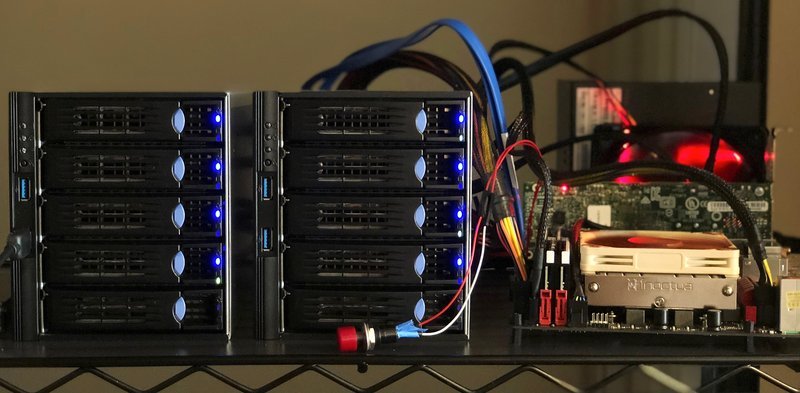
SAS3 is more expensive across the board – you pay a slight premium (not much) for the drives, and then about double for the controller (I paid $275 for the Microsemi Adaptec 8805E 12Gb/s controller vs $120 for my LSI 9207-8i 6Gb/s controller) and cables (if you’ve made it this far though, $25 is unlikely to break the bank). The biggest pain was finding a 12Gb/s backplane – they didn’t have those for my NAS case, and other cases available were pretty much all ginormous rackmounts. The cheapest option for me ended up being simply buying 2 hot-swap 12Gb/s enclosures (you must get the T3 model w/ the right backplane) and just letting them live free-range
BTW, just as a note: if you have a choice between 512b and 4K (AF) sector drives, choose the latter, performance will be much better. If you are using ZFS, be sure to create your pool with ashift=12 to match the sectors
All this work is for bandwidth that honestly, 8 spinning-rust disks are unlikely to use, so if I were doing it over again, I’d probably go with SATA and save myself a lot of time and money.
Speaking of wastes of time and money, the biggest cause of my NAS building woes by far was the Ryzen 2400G APU (Raven Ridge). Quite simply, even as of July 2018, I simply can’t recommend the Ryzen APUs if you’re running Linux. You’ll have to pay more and have slim pickings on the motherboard front if you want mini-ITX and ECC, but you’ll probably spend a lot less time pulling your hair out.
I bought the ASRock Mini-ITX board as their reps had confirmed ECC and Raven Ridge support. Of course, the boards in channel didn’t (still don’t depending on manufacture) support the Ryzen APUs out of the box and you can’t boot to update the BIOS without a compatible CPU. AMD has a “boot CPU” program but it was an involved process and after a few emails I just ordered a CPU from Amazon to use and sent it back when I finished (I’ve made 133 Amazon orders in the past 6 months so I don’t feel too bad about that). I had intermittent booting issues (it’d boot a blank screen about half the time) w/ Ubuntu 18.04 until I updated to the latest 4.60 BIOS).
With my LSI 9207 card plugged in, 18.04 LTS (4.15 kernel) seemed happy enough (purely with TTYs, I haven’t run any Xorg on this, which has its own even worse set of issues), however with the Adaptec 8805E, it wouldn’t boot at all. Not even the install media would boot on Ubuntu, however, the latest Arch installer would (I’d credit the 4.17 kernel). There’s probably some way to slipstream an updated kernel into LTS installer (my preference generally is to run LTS on servers), but in the end, I couldn’t be that bothered and just went with Arch (and archzfs) on this machine. YOLO!
After I got everything seemingly installed and working, I was getting some lockups overnight. These hangs left no messages in dmesg or journalctl logs. Doing a search on Ryzen 2400G, Raven Ridge, and Ryzen motherboard lockups/hangs/crashes will probably quickly make you realize why I won’t recommend Ryzen APUs to anyone. In the end I went into the BIOS and basically disabled anything that might be causing a problem and it seems to be pretty stable (at the cost of constantly high power usage:
Disable Cool’n’Quiet
Disable Global C-States
Disable Sound
Disable WAN Radio
Disable SATA (my boot drive is NVMe)
Disable Suspend to RAM, other ACPI options
It’s also worth noting that while most Ryzen motherboards will support ECC for Summit Ridge (Ryzen 1X00) and Pinnacle Ridge (non-APU Ryzen 2X00), they don’t support ECC on Raven Ridge (unbuffered ECC memory will run, but in non-ECC mode), despite Raven Ridge having ECC support in their memory controllers. There’s a lot of confusion on this topic if you do Google searches so it was hard to suss out, but from what I’ve seen, there have been no confirmed reports of ECC on Raven Ridge working on any motherboard. Here’s the way I checked to see if ECC was actually enabled or not:
# journalctl -b | grep EDAC
Jul 28 20:11:31 z kernel: EDAC MC: Ver: 3.0.0
Jul 28 20:11:32 z kernel: EDAC amd64: Node 0: DRAM ECC disabled.
Jul 28 20:11:32 z kernel: EDAC amd64: ECC disabled in the BIOS or no ECC capability, module will not load.

# modprobe -v amd64_edac_mod ecc_enable_override=1
insmod /lib/modules/4.17.10-1-ARCH/kernel/drivers/edac/amd64_edac_mod.ko.xz ecc_enable_override=1
modprobe: ERROR: could not insert 'amd64_edac_mod': No such device
# edac-ctl --status
edac-ctl: drivers not loaded.
# edac-ctl --mainboard
edac-ctl: mainboard: ASRock AB350 Gaming-ITX/ac
OK, so what’s the end result look like? The raw zpool (64TB == 58.2TiB):
# zpool list
NAME   SIZE  ALLOC   FREE  EXPANDSZ   FRAG    CAP  DEDUP  HEALTH  ALTROOT
z       58T  5.39T  52.6T         -     0%     9%  1.00x  ONLINE  -
# df -h | grep z
Filesystem      Size  Used Avail Use% Mounted on
z                40T  4.0T   37T  10% /z

# zfs get compressratio z
NAME  PROPERTY       VALUE  SOURCE
z     compressratio  1.01x  -
Temperatures for the card (I have a 120mm fan pointed at it) and the drives seem pretty stable (+/- 1C or so):
# arcconf GETCONFIG 1 | grep Temperature
   Temperature                              : 42 C/ 107 F (Normal)
         Temperature                        : 41 C/ 105 F
         Temperature                        : 44 C/ 111 F
         Temperature                        : 44 C/ 111 F
         Temperature                        : 40 C/ 104 F
         Temperature                        : 40 C/ 104 F
         Temperature                        : 43 C/ 109 F
         Temperature                        : 43 C/ 109 F
         Temperature                        : 40 C/ 104 F
Performance seems decent, about 300MB/s copying from a USB-C/SATA SSD. Here is are the results of an iozone (3.482) run (settings taken from this benchmark):
# iozone -i 0 -i 1 -t 1 -s16g -r16k  -t 20 /z
        File size set to 16777216 kB
        Record Size 16 kB
        Command line used: iozone -i 0 -i 1 -t 1 -s16g -r16k -t 20 /z
        Output is in kBytes/sec
        Time Resolution = 0.000001 seconds.
        Processor cache size set to 1024 kBytes.
        Processor cache line size set to 32 bytes.
        File stride size set to 17 * record size.
        Throughput test with 20 processes
        Each process writes a 16777216 kByte file in 16 kByte records

        Children see throughput for  1 initial writers  = 1468291.75 kB/sec
        Parent sees throughput for  1 initial writers   = 1428999.28 kB/sec
        Min throughput per process                      = 1468291.75 kB/sec
        Max throughput per process                      = 1468291.75 kB/sec
        Avg throughput per process                      = 1468291.75 kB/sec
        Min xfer                                        = 16777216.00 kB

        Children see throughput for  1 rewriters        = 1571411.62 kB/sec
        Parent sees throughput for  1 rewriters         = 1426592.78 kB/sec
        Min throughput per process                      = 1571411.62 kB/sec
        Max throughput per process                      = 1571411.62 kB/sec
        Avg throughput per process                      = 1571411.62 kB/sec
        Min xfer                                        = 16777216.00 kB

        Children see throughput for  1 readers          = 3732752.00 kB/sec
        Parent sees throughput for  1 readers           = 3732368.39 kB/sec
        Min throughput per process                      = 3732752.00 kB/sec
        Max throughput per process                      = 3732752.00 kB/sec
        Avg throughput per process                      = 3732752.00 kB/sec
        Min xfer                                        = 16777216.00 kB

        Children see throughput for 1 re-readers        = 3738624.75 kB/sec
        Parent sees throughput for 1 re-readers         = 3738249.69 kB/sec
        Min throughput per process                      = 3738624.75 kB/sec
        Max throughput per process                      = 3738624.75 kB/sec
        Avg throughput per process                      = 3738624.75 kB/sec
        Min xfer                                        = 16777216.00 kB


        Each process writes a 16777216 kByte file in 16 kByte records

        Children see throughput for 20 initial writers  = 1402434.54 kB/sec
        Parent sees throughput for 20 initial writers   = 1269383.28 kB/sec
        Min throughput per process                      =   66824.69 kB/sec
        Max throughput per process                      =   73967.23 kB/sec
        Avg throughput per process                      =   70121.73 kB/sec
        Min xfer                                        = 15157264.00 kB

        Children see throughput for 20 rewriters        =  337542.41 kB/sec
        Parent sees throughput for 20 rewriters         =  336665.90 kB/sec
        Min throughput per process                      =   16713.62 kB/sec
        Max throughput per process                      =   17004.56 kB/sec
        Avg throughput per process                      =   16877.12 kB/sec
        Min xfer                                        = 16490176.00 kB

        Children see throughput for 20 readers          = 3451576.27 kB/sec
        Parent sees throughput for 20 readers           = 3451388.13 kB/sec
        Min throughput per process                      =  171099.14 kB/sec
        Max throughput per process                      =  173923.14 kB/sec
        Avg throughput per process                      =  172578.81 kB/sec
        Min xfer                                        = 16505216.00 kB

        Children see throughput for 20 re-readers       = 3494448.80 kB/sec
        Parent sees throughput for 20 re-readers        = 3494333.50 kB/sec
        Min throughput per process                      =  173403.55 kB/sec
        Max throughput per process                      =  176221.58 kB/sec
        Avg throughput per process                      =  174722.44 kB/sec
        Min xfer                                        = 16508928.00 kB
While running this it looked like the each of the 4 cores hit about 10-15% on htop and load about 21-22 (waiting on iozone of course). Here are the arcstats during the top of the run:
Anyway, those were some surprising big (totally synthetic numbers), but I don’t have much of a reference, so a comparison, I ran the same test on the cheap ADATA M.2 NVMe SSD that I use for my boot drive:
# iozone -i 0 -i 1 -t 1 -s16g -r16k -t 20 ./
	File size set to 16777216 kB
	Record Size 16 kB
	Command line used: iozone -i 0 -i 1 -t 1 -s16g -r16k -t 20 ./
	Output is in kBytes/sec
	Time Resolution = 0.000001 seconds.
	Processor cache size set to 1024 kBytes.
	Processor cache line size set to 32 bytes.
	File stride size set to 17 * record size.
	Throughput test with 20 processes
	Each process writes a 16777216 kByte file in 16 kByte records

	Children see throughput for  1 initial writers 	=  737763.19 kB/sec
	Parent sees throughput for  1 initial writers 	=  628783.43 kB/sec
	Min throughput per process 			=  737763.19 kB/sec
	Max throughput per process 			=  737763.19 kB/sec
	Avg throughput per process 			=  737763.19 kB/sec
	Min xfer 					= 16777216.00 kB

	Children see throughput for  1 rewriters 	=  537308.31 kB/sec
	Parent sees throughput for  1 rewriters 	=  453965.01 kB/sec
	Min throughput per process 			=  537308.31 kB/sec
	Max throughput per process 			=  537308.31 kB/sec
	Avg throughput per process 			=  537308.31 kB/sec
	Min xfer 					= 16777216.00 kB

	Children see throughput for  1 readers 		=  710123.75 kB/sec
	Parent sees throughput for  1 readers 		=  710108.56 kB/sec
	Min throughput per process 			=  710123.75 kB/sec
	Max throughput per process 			=  710123.75 kB/sec
	Avg throughput per process 			=  710123.75 kB/sec
	Min xfer 					= 16777216.00 kB

	Children see throughput for 1 re-readers 	=  709986.50 kB/sec
	Parent sees throughput for 1 re-readers 	=  709970.87 kB/sec
	Min throughput per process 			=  709986.50 kB/sec
	Max throughput per process 			=  709986.50 kB/sec
	Avg throughput per process 			=  709986.50 kB/sec
	Min xfer 					= 16777216.00 kB

# oops, runs out of space trying to run the 20 thread test
# only 90GB free on the boot drive...
One more iozone test, pulled from this benchmark. The ZFS volume:
	Using minimum file size of 131072 kilobytes.
	Using maximum file size of 1048576 kilobytes.
	Record Size 16 kB
	OPS Mode. Output is in operations per second.
	Auto Mode
	Command line used: iozone -n 128M -g 1G -r 16 -O -a C 1
	Time Resolution = 0.000001 seconds.
	Processor cache size set to 1024 kBytes.
	Processor cache line size set to 32 bytes.
	File stride size set to 17 * record size.
                                                              random    random     bkwd    record    stride
              kB  reclen    write  rewrite    read    reread    read     write     read   rewrite      read   fwrite frewrite    fread  freread
          131072      16   107383   153753   454176   497752   402551   100747   337201    228240    143842   149257   107891   243222   227732
          262144      16   114165   134997   194843   209168    62298    78727   166649    227852     47554   120907   121755   206258   208830
          524288      16   108586   130493   228032   235020    53501    48555   190495    224892     45273   110338   113536   229965   205326
         1048576      16    83337    94119   203190   231459    46765    34392   180697    230120     44962    92476   112578   198107   230100
And the boot NVMe SSD:
	Using minimum file size of 131072 kilobytes.
	Using maximum file size of 1048576 kilobytes.
	Record Size 16 kB
	OPS Mode. Output is in operations per second.
	Auto Mode
	Command line used: iozone -n 128M -g 1G -r 16 -O -a C 1
	Time Resolution = 0.000001 seconds.
	Processor cache size set to 1024 kBytes.
	Processor cache line size set to 32 bytes.
	File stride size set to 17 * record size.
                                                              random    random     bkwd    record    stride
              kB  reclen    write  rewrite    read    reread    read     write     read   rewrite      read   fwrite frewrite    fread  freread
          131072      16   124072   218418   407623   392939   462018   211145   392298    520162    435927   218552   206769   411371   453720
          262144      16   125471   236933   454936   427993   449000   212884   423337    525110    452045   229310   221575   451959   494413
          524288      16   123998   252096   520458   459482   511823   229332   496952    526485    509769   243921   239714   519689   547162
         1048576      16   125236   266330   562313   480948   476196   220034   498221    529250    471102   249651   247500   560203   571394
Now granted, this is a cheap/slow NVMe SSD (I have a 512GB 970 Pro in a box here, but I’m too lazy/don’t care enough to reinstall on that to test), but the ZFS results surprised me. Makes you wonder whether an array of enterprise SAS SSDs would beat out say those PCIe SSD cards, but I don’t get revved enough about storage speeds to really do more than pose the question. I may do a bit more reading on tuning, but I’m basically limited by my USB and network connection (a single Intel I211A 1 Gbps) anyways. Next steps will be centralizing all my data, indexing, deduping, and making sure that I have all my backups sorted. (I may have some files that aren’t’ backed up, but that’s outweighed by many, many files that I probably have 3-4 copies of…)
Oh, and for those looking to build something like this (again, I’d reiterate: don’t buy a Ryzen APU if you plan on running Linux and value your sanity), here’s the final worksheet that includes the replaced parts that I bought putting this little monster together (interesting note: $/GB did not go down for my storage builds for the past few years):
Misc notes:
If you boot with a USB attached it’ll boot up mapped as /dev/sda, nbd if you’re mapping your ZFS properly
Bootup takes about 1 minute – about 45s of that is with the controller card BIOS
I replaced the AMD stock cooler w/ an NH-L9a so it could fit into the NSC-810 NAS enclosure, but obviously, that isn’t needed if you’re just going to leave your parts out in the open (I use nylon M3 spacers and shelf liners to keep from shorting anything out since I deal with a lot of bare hardware these days)
2018-08-30 UPDATE: I’ve been running the NAS for a month and while it was more of an adventure than I would have liked to setup, it’s been performing well. Since there’s no ECC support for Raven Ridge on any motherboards at the moment, I RMA’d my release Ryzen 7 1700 (consistent segfaults when running ryzen-test but I never bothered to swap it since I didn’t want the downtime and I wasn’t running anything mission critical) so I could swap that into the NAS to get ECC support. This took a few emails (AMD is well aware of the issue) and about two weeks to do the swap. Once I got the CPU back, setup was pretty straightforward – the only issue was I was expecting the wifi card to use a mini-PCIe slot, but it uses a B-keyed M.2 instead, so I’m running my server completely headless ATM until I bother to find an adapter. (I know I have one somewhere…)
# journalctl -b | grep EDAC
Aug 30 08:00:28 z kernel: EDAC MC: Ver: 3.0.0
Aug 30 08:00:28 z kernel: EDAC amd64: Node 0: DRAM ECC enabled.
Aug 30 08:00:28 z kernel: EDAC amd64: F17h detected (node 0).
Aug 30 08:00:28 z kernel: EDAC MC: UMC0 chip selects:
Aug 30 08:00:28 z kernel: EDAC amd64: MC: 0:  8192MB 1:     0MB
Aug 30 08:00:28 z kernel: EDAC amd64: MC: 2:     0MB 3:     0MB
Aug 30 08:00:28 z kernel: EDAC amd64: MC: 4:     0MB 5:     0MB
Aug 30 08:00:28 z kernel: EDAC amd64: MC: 6:     0MB 7:     0MB
Aug 30 08:00:28 z kernel: EDAC MC: UMC1 chip selects:
Aug 30 08:00:28 z kernel: EDAC amd64: MC: 0:  8192MB 1:     0MB
Aug 30 08:00:28 z kernel: EDAC amd64: MC: 2:     0MB 3:     0MB
Aug 30 08:00:28 z kernel: EDAC amd64: MC: 4:     0MB 5:     0MB
Aug 30 08:00:28 z kernel: EDAC amd64: MC: 6:     0MB 7:     0MB
Aug 30 08:00:28 z kernel: EDAC amd64: using x8 syndromes.
Aug 30 08:00:28 z kernel: EDAC amd64: MCT channel count: 2
Aug 30 08:00:28 z kernel: EDAC MC0: Giving out device to module amd64_edac controller F17h: DEV 0000:00:18.3 (INTERRUPT)
Aug 30 08:00:28 z kernel: EDAC PCI0: Giving out device to module amd64_edac controller EDAC PCI controller: DEV 0000:00:18.0 (POLLED)
Aug 30 08:00:28 z kernel: AMD64 EDAC driver v3.5.0
Aug 30 08:00:32 z systemd[1]: Starting Initialize EDAC v3.0.0 Drivers For Machine Hardware...
Aug 30 08:00:32 z systemd[1]: Started Initialize EDAC v3.0.0 Drivers For Machine Hardware.

# edac-ctl --status
edac-ctl: drivers are loaded.
# edac-ctl --mainboard
edac-ctl: mainboard: ASRock AB350 Gaming-ITX/ac

# edac-util -v
mc0: 0 Uncorrected Errors with no DIMM info
mc0: 0 Corrected Errors with no DIMM info
mc0: csrow0: 0 Uncorrected Errors
mc0: csrow0: mc#0csrow#0channel#0: 0 Corrected Errors
mc0: csrow0: mc#0csrow#0channel#1: 0 Corrected Errors
edac-util: No errors to report.