Well, turns out there’s a reason for that – the LabelManager PnP actually labels itself as a HID device, not a printer! (lsusb -v to peep the details)…
Luckily, with a bit of searching, I found a nice little Python 3 script called dymoprint (github) that reverse-engineered the USB protocol and works perfectly. Another dev subsequently wrote a Perl script that generates 64px tall bitmaps to the printer. (I have lots of existing image generation code to build a Python version of this, but honestly, the first dymoprint script does just about everything I want, which is just to print some simple labels).
UPDATE: Just as a temporary (Fall 2018) note for those interested (I think this is going on for another month) but Omnicharge has a new device, the Omni Ultimate, that looks pretty great and is only $50 more than their Omni 20 device on pre-order ATM with significantly beefed up specs. My only reservation about recommending for everyone is that it has a 145Wh battery that puts it in the may require approval category and it’s a bit overkill, but it has the highest DC output voltage (150W) and that is adjustable from 5-60V in 0.1V increments (!), which makes it an amazing option if you have a lot of devices (drones, cameras, laptops, etc) that you are carrying around.
I got sidetracked into looking at some of the latest big power bank options (something I last did a year or two ago) and there’s been a few interesting updates. There are a lot more “stick” form-factor inverters like the Jackery PowerBar, although personally I’d much rather have 12V and 19V DC output.
If you’re looking for the cheapest, most compact, highest power output, flight-allowable (100Wh max) battery, it actually remains the same – the RAVPower 23000mAh or the Poweradd Pilot Pro2 (basically the same design). This is pretty no-frills/basic, but has impressive energy density and gets the job done, with 12V and 19V output and decent amperage.
If you need an inverter or are price insensitive, the Omnicharge Omni 20 is pricey, but is very well designed. It also has extremely wide input (4.5-36V) and output (1-24V) options, and the output is selectable to 0.1V – that means you can for example, charge a Mavic Pro battery directly w/o an additional adapter, as it wants 13V+ to charge. It will also take an input of 45W, tied for the fastest charging of anything I’ve run across. It’s surprisingly the same volume as the RAVPower battery, although a bit heavier and less energy dense. There’s also a new USB-C version, and while I don’t care about the lack of inverter, it’s also missing the variable DC output entirely, so not for me, but it’s lighter and cheaper, so maybe worth considering if you’re all USB-C PD.
The Goal Zero Sherpa 100 has come down a bit in price a bit and is also a great option. It has a detachable inverter, is chainable, and most importantly, has the highest power output (120W max – 10A @ 12V and 6A @ 19V) and the fastest recharge time of anything I came across. While I haven’t used the Sherpa personally, I’ve had good past experience w/ many types of Goal Zero products in some pretty torturous production conditions.
I’ve included my spreadsheet below, I got a bit pooped out after a while since there are so many clones/bad options available. There are a few decent options that are way too big to fly with. Oh, for fun, I do have a sheet specced out if you know what you’re doing and thinking about building your own pack and wanted to build something more compact that can output 200W. Oh, the Wirecutter is only mildly wrong this time, but mostly because they assume that you want to recharge your laptop or other DC devices and suffer inverter power loss in the first place.
I’ve been running urxvt for years and have it pretty much dialed in as I like it with base16 Ocean and a bunch of mostly font-specific options. It works reliably and quickly for me, without any muss or fuss (I run my Openbox without any menubars and the chromeless, super minimal look fits right in).
There’s just one problem. I use nload a lot (bandwidth monitoring tools deserve it’s own writeup one day), and it flickers in urxvt. Now, to be clear, this isn’t a bug with urxvt, which is merely doing what it’s told, but I noticed that this sort of ncurses flicker on clear screen, due to the way it buffers, doesn’t happen in vte-based terminal emulators.
I’d previously tried a few other terminal emulators (Terminator, sakura) and I gave alacritty and xst and (a few others) a good try this time around, but I ended up settling on termite as basically a drop-in replacement for urxvt.
Setting up the fonts and colors was relatively painless and you can even dynamically reload those. The one niggle was that the left scrollbar was much more distracting than in urxvt. A little bit of searching led me to a related issue, which pointed me on ways to update GTK styles. It took a bit of tweaking to get things just right (there was some stray corner rounding that required some creative CSS), but here’s where I ended up with my ~/.config/gtk-3.0/gtk.css:
One thing to note, is that termite is actually a bit slower than urxvt (even ignoring it’s slightly weird refresh – when showing lots of text it tends to buffer and seems to skip rendering things you might see zip by in other terminal emulators), but it does handle mpv --vo tct rendering correctly (whereas my urxvt just barfs). For some more on terminal emulator performance, this alacritty github issue is a good start (alacritty may be hot shit on OS X, but it’s slower than urxvt on Linux and I don’t like its HiDPI handling). Also related and interesting is this Dan Luu writeup on Terminal latency.
And that wraps up today’s episode of Yak Shavers. This might become an ongoing series as I tweak some of the remaining issues on my Linux systems (next might be migrating from 1Password due to the Firefox plugin being broken, or better notification supression when videos are playing). Past issues/fixes have been largely chronicled in my Arch Linux Install doc, although a number of new things are in a private wiki. One of my goals this year is to figure out the best way to publish most of that stuff publicly.
By far the most insecure piece of software that I still run on my main web server these days (where you’re reading this!) is WordPress. It seems like there’s never more than a few months (also) that go by without some new XML-RPC exploit or some-such pops up. The easiest way to stay reasonably secure is with regular updates. About 4 years ago I automated that with a simple daily WP-CLI (best tool) update script that basically looks like:
I also run a few security plugins, like Activity Log, WP fail2ban, and Sucuri Security and I haven’t seemed to have had too many problems over the past few years on my main blog, however my terribly neglected travel blog apparently wasn’t getting regular updates this past year and needed a bit of delousing (some spam urls etc, that just needed to be reverted) – the sad thing is that it had an update script, but wasn’t being run in cron (wah wah).
I originally had somewhat more ambitious plans for my 2017 wrap up, but well, the end of the year is just about here so instead I’ll just type for a couple hours, hit publish, and call it a day.
Part of the motivation is that it’s felt like a good time again to write up some of what I’ve been thinking about in technology trends. In 2006, while I was hip-deep in Web 2.0 work (and my blog output had already fallen into the abyss where it remains today) and I wrote up a 5 year tech projection. I ended up revisiting it 5 years later and you know what, didn’t too badly. What’s interesting reviewing it now is the a few of the things that I had missed were actually on the cusp then and happened shortly after. I didn’t do a direct followup, but did do a 2013 Review in Tech writeup – the most interesting things that happened that year weren’t in consumer/SV tech scene (which was deep in their Uber for X/app obsession at the time).
In 2014 I started collecting some Emerging Tech notes that I never published. That might be worth checking out (there are some late 2017 notes as well) – these seemed to have caught the tech zeitgeist a couple years in advance but it’s a bit fuzzy on how these will play out. This year, I also started collected some notes on a future-trend focused Tumblr (it’s not private per-se, just not very publicized/widely read, although the same can be said for this blog at this point – just pissing into the wind). For 2018, I’m hoping to both publish more and to better rationalize where/how I’m publishing what I’m tracking.
Now enough of that, and into the weeds. Per usual, I spent a lot of time reading things this year (example) – too much on Twitter and Reddit, but on the whole, more worthwhile things than not – I spent a fair amount of time digging through writings of the socio-techno-political variety, lots on crypto-economics and other financial topics, and rounded off by the usual geek topics. Also, a lot more YouTube than usual. This marked year 4 of semi-nomadicism although I may spend some more time settled to try to get through a backlog of housekeeping. Being out and about in different parts of the world helps give some perspective (places visited for the first time included Colombia, Cuba, Iceland, Greece, Kazakhstan, and Brazil).
Like many others, I spent much of the end of last year and the beginning of this year reading and thinking about the state (and fate) of liberal democracy in the modern world. I collected some of that into a doc Sensemaking in the Age of Social Media. While most of the participants haven’t realized it yet (or are disingenously denying it), we are now living in the age of weaponized information – memetic warfare. This is as cyberpunk and dystopian as it sounds, and it’s worth giving a shout out to sci-fi authors. The easiest way to understand where we are is to re-read Gibson, Sterling, Stephenson, Egan, Stross, Doctorow et al with the lens of what we are experiencing. It’s also worth thinking about how unprepared humans and human societies currently are against the future-shock mechanization of the modern infosphere (hyper-personalization and filter bubbles, bot/troll manipulation and other social signal hacks, infoglut and overload, clickbait and yes, fake news). These are second order effects that web pioneers and SV techies were unprepared for and misincentivized to address (who knew that driving engagement for advertising revenue would bring down free society, wah wah). This of course made it’s way into the news zeitgeist this year (that the modern media landscape is a key part of this dysfunction is an irony that is sadly lost to most, I believe). A smattering of headlines: Former Facebook executive: social media is ripping society apart, Facebook must wake up to its disastrous potential – it has the power to subvert American democracy, What Facebook Did to American Democracy, Facebook Wins, Democracy Loses, Can democracy survive Facebook? – now this is all a bit unfair to Facebook, after all Twitter is perhaps even more of a trash fire (and @realDonaldTrump will probably start WW3 on it next year). Anyway, before I go full rant – there aren’t easy answers, but it’s clear that we must fix this. These are design failures – some driven purposefully by misaligned economic incentives and externalized risk, and some by the short-sightedness and failings of designers, engineers, and product managers. IMO, if we can not fix this, humanity will probably not survive.
Over the course of the year I tried to crystallize a line of thought – that there were no problems humanity faced that could not be solved, if we could solve the problem of how to cooperate in rational self interest. Not such a deep insight, and not pithy enough yet (still a work in progress, obviously) but good enough as a direction to point one’s mental energy and efforts towards. (For those in doubt, and as a benchmark for this, nominal global GDP is about 80T USD – look at any looming existential crisis that we face and ask how much actual effort/cost it would take to address, mitigate, or fix.)
Also tying into perhaps the next topic, on cryptocurrencies. Or perhaps, more accurately a discussion on distributed trust network, or resilient distributed consensus in the presence of byzantine adversaries, or about censorship-resistant transactions, or incentivization structures for said networks.
Yes, we are currently in a bit of a mania phase of a bubble at the moment. One that hasn’t, but will inevitably pop (although I wouldn’t pack it in until the institutional money gets a dip – this might not even be the big bubble yet in the same way that 2014 wasn’t). At the end of it though we’ll be where we were at the end of the Internet bubble – with a whole bunch of new toys to play with that with the power to reshape society. Hopefully, having gone through it once already, we can try again a bit wiser.
A few interesting recent reads that might spark some ideas:
OK, well, enough of that. Perhaps a bit less on the tech insights than a more planned essay would have been. My resolution for the coming year will be to figure out a better way of collecting and publishing my research on an ongoing basis. Maybe not quite gwern style but I think that a lot of what I come across and read about might be useful to others, and the act of publishing would probably encourage better organization/clear thinking. Another resolution: trying to waste less time on the Internet.
I’ve been gathering up some year-end thoughts, but in the meantime, some things I’ve stumbled upon that point to some trends I’ve been paying attention to…
This write up AlphaZero and DeepMind, (it became the best chess player in the world in 24 hours) is pretty mind-bending. A recent article made an argument against recursive self-improvement (see also) – I will admit to not having done enough research on the subject matter, just casual reading (even my copy of Bostrom’s Superintelligence is still on the TOREAD list) but regardless of any worries of machine overlords, unquestionably AI will get exponentially more powerful and useful in the coming years
One last cryptocurrency and society link, this essay on ledgers and “cryptoeconomics” (defined within as “the institutional consequences of cryptographically secure and trustless ledgers is some good food for thought.
We’re not done though. I tried my luck on clicking around a more 80s JPop tracks (good, but nothing mindblowing) until I got to this 80’s Japanese mixtape. The first track by Tatsuro Yamashita, Hot Shot, is fantastic.
This recent St. Vincent performance popped up in my feed today:
Which was good, but led to a much more interesting video, a series called “Guitar Moves” (interestingly, this one was apparently pulled from the original channel for some reason)
The finger-style rock guitaring got me thinking about what M Ward is up to these days (Gibson sponsorship apparently). Here he is jamming backstage in 2007:
Here’s a 2016 live KEXP set:
The KEXP YouTube channel is great, btw. One of my favorite vids from last year (I don’t think I ever posted it here) was this rendition of Okkervil River’s Unless It’s Kicks (completely different from the album version, totally awesome – the strat and the bass combo, just fantastic):
Back on the M Ward tip, ended up reading an old Gibson interview watching a couple She & Him vids. From their second album (listening to the V0 on good cans is actually much more interesting)
which led to a much more recent 2014 video:
The top comment asks to see the green onesie, and sure enough, here’s the making of:
Fun stuff. Oh, also today:
To be clear: They didn't take all the stats down. They only took down the ones they didn't like.
One of the things that never fails to surprise me is the sheer amount of amazing/interesting stuff that pops up every day. Over the past few months, I’ve quietly been trying to capture a few of the highlights and have been planning on figuring out a better system, here for example is a more complete list of stuff just from the past day or two of my reading. Most of this I have just sent to Pocket or my ever growing Watch List (there simply aren’t enough hours in the day):
The Shouting Class – a fantastic and very insightful essay on how social media has changed the nature of social discourse
Hacker, Hack Thyself – the comments are particularly interesting w/ sysadmin stories (hn)
base65536 – “Base65536 is a binary encoding optimised for UTF-32-encoded text and Twitter. This JavaScript module, base65536, is the first implementation of this encoding.” (hn)
It’s worth noting that this is a sampling from about one day’s worth of bookmarks one three aggregators (Twitter, Hacker News, and Reddit) that I only check a few times over the course of the day (this was on a travel day no less). Also that simply going back and gathering and sifting all these out took about an hour this morning.
Putting a little bit of thought on how to better manage all this.
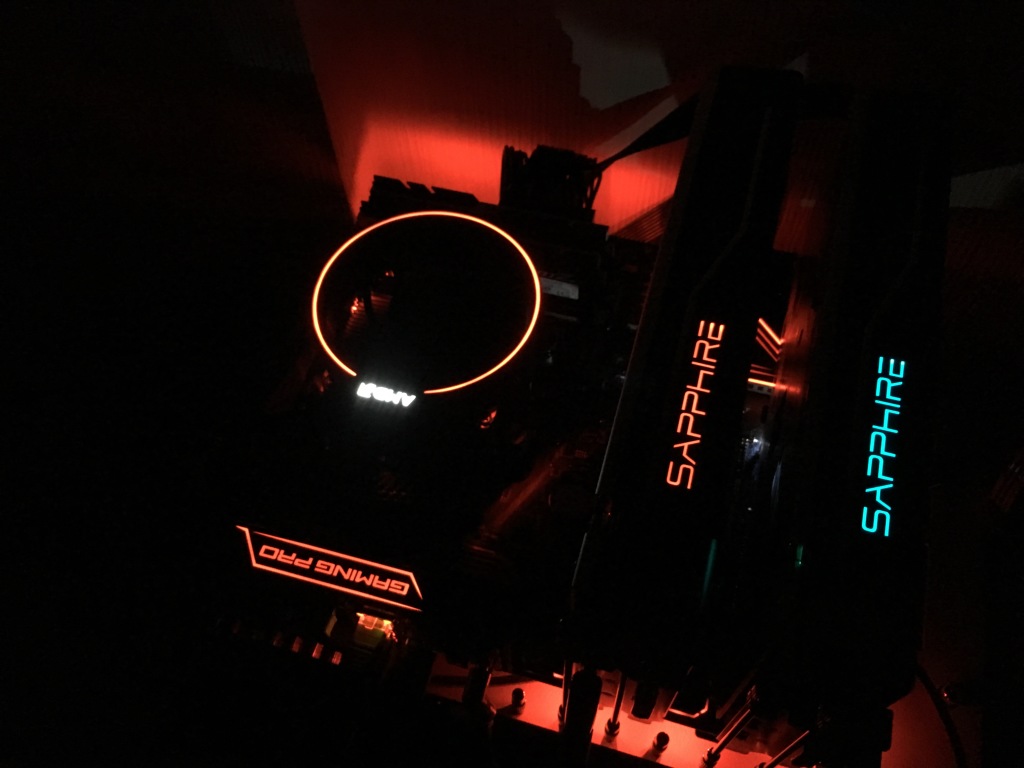
With the 4K drone footage I’ve been editing, I’ve been really pushing my Gigabyte Aero 14 past its limits, and since I was planning on spending a fair bit of time in one place for the next couple months (Tokyo until June), and since my bet on AMD last year has paid off well, it seemed fitting to put together a new Ryzen system.
I was traveling most of March, so I wasn’t in a launch-day rush, but after reading some reviews, I saved a couple hundred bucks and went with a $320 Ryzen 7 1700. As a bonus, the 1700 comes with a nice looking (and pretty functional) CPU cooler and my copy easily overclocks to 3.7GHz (3.8-3.9 pushing voltages, but I’d probably upgrade the cooler in that case – you can purchase pre-binned versions here).
I bought an MSI X370 Gaming Pro Carbon primarily because it was a nice monochrome look and had dual M.2 support (only the first slot runs at PCIe 3.0 x4 sadly due to the Ryzen 7/x370’s PCIe lane availability), but I wouldn’t recommend it. While it’s had some BIOS updates, it still doesn’t have the latest 4/10 AGESA update, and in general has had sluggish support and a few issues (my personal gripes: pokey POSTing, no last-good/soft-CMOS reset). Personally, if I was buying a top-of-the-line board, I’d probably go with the Asus ROG CH6 – while it doesn’t have a second M.2 slot, you could put a PCIe adapter board on the last slot for that. As a bonus, there are a bajillion USB ports.
Instead of buying new GPUs, I just brought along a couple RX470 mining cards (sadly, these two weren’t running the past two months – that would have been $400-600 of missed earnings w/ the ETH run-up). I have them beavering away in the background right now while the system idles. (I am running the latest 17.4.2 drivers but with a BIOS signature check bypass).
One note during installation is that I had hard-lockup problems when installing from a 2015 Windows 10 stick – you’ll want to make a new one, w/ a 12/2016 ISO I didn’t have any problems.